top of page
The Urban Company
Redesigning the customer experience for the Urban Company Mobile app


Role : UX Designer & Researcher
Timeline : 1 Week Design Sprint
Team : Individual
Tools : Figma, Miro
Overview
The Urban Company (formerly UrbanClap) was launched in November 2014. It is the largest provider of home services in regions like India, UAE, Singapore and Australia.
Customers usually turn to Urban Company for beauty services, massage therapies, cleaning, plumbing, carpentry, appliance repair, etc. The company’s vision is to empower millions of service professionals across the world to deliver services at home like never seen before.
Scope & Constraints
1. My scope was to only find pain points of users who regularly use the Urban company mobile app.
2. Since I did not have persona, I conducted a quick and dirty research with 5 users to gain in depth insights.
3. Since it was a design sprint, I had to complete within 1 week, and address only the pain points.
4. Constraints included only designing specific screens to address pain points and not to redesign complete app.
5. Process : design sprint - Map, sketch, ideate, prototype and test.
Persona

Day 1 Map : Understand Pain Points
Updating address
is not so smooth.
Added Items cannot be seen at one place.
Unnecessary revisit of each item for editing or removing
Booking history
is present but
rarely used
though.
User has to select explicitly on option ' I don't want add ons. '
Exploring Design Opportunities
How might we improve the experience of the customers if they want to frequently edit their cart - add or remove items ?
How might we allow the customer to easily change their location address or update it?
How might we bring the feature to repeat past orders or bookings ?
How might we bring recommendations during the checkout ?
User Map

CleanSpace - User Flows-1
Describe your image

CleanSpace - User Flows-2
Describe your image
CleanSpace - User Flows-1
Describe your image
1/2
Day 2 Sketching : Putting Ideas
I conducted ‘Lightning Demos’ for 20 mins. It’s basically a process where we do competitor analysis. However the competitor could be from the other industry as well whose app or web product inspires us in some way to address the problem in hand.
For inspiration I chose, leaders from the food industry. I took inspiration from the way they maintain user profiles. I did thorough 30 minutes of research in apps like Swiggy, Zomato and Bigbasket.
Lightning Demos

Crazy 8s Sketches

Final Sketch

Day 3 Decide : Complete Storyboarding With Wireflows
After spending good enough time on brainstorming and making crazy 8 sketches, I finally was able to unfold a story of my design sprint. Since earlier I had made user flows, with the help of crazy 8 sketches I could decide upon my critical screens.
With these critical screens I formed a storyboard which began with my homepage - updating address - repeat booking - go to cart flow. This was divided into 2 user flows and I also drew workflows in the sketches to explain the navigation.
Storyboarding

Day 4 Prototype
Once I had prepared my storyboard, I jumped to Adobe XD to realise my hi-fi screens along with prototype. Since I was following my scope and constraints I did not design the whole app. I added hypothetical images on the homepage, just to complete the space. I concentrated on the pain points and solutions found for them.
I created solution to solve the complex problem of updating address in The Urban company. I also added Cart to the bottom navigation bar so that now user will not feel pain to browse through the categories and check what was added. I also added the feature of repeat booking to cut down their long user journey.
Design Opportunity 1
How might we improve the experience of the customers if they want to frequently
edit their cart - add or remove items ?
Cart Experience
A cart experience is very important feature for
customers as they want to constantly revisit it before checkout.
Initially there was no cart and customers had to
select items from category page and checkout. In case they selected the items and closed their app, there was no way to revisit their
added items list.
A cart at the bottom tab bar makes this process
quick and easy.

Design Opportunity 2
How might we allow the customer to easily change their location address or update it ?

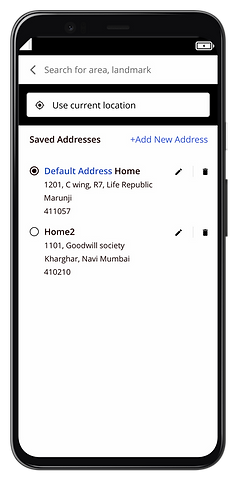
Address Updation
Updating address is one of the most important user
flow for customer. They expect to locate their address in an efficient manner.
Previously address updation used to happen only while checkout and there was no edit in the homepage.
The current design explore more ways to manipulate
the address and while in homepage, user can quickly edit it in case GPS tracking does not work.
Design Opportunity 3
How might we bring the feature to repeat past orders
or bookings ?
Repeat Bookings
Having been inspired from the famous food apps I introduced repeat booking in the Urban Company app.
Initially there was just a My bookings page showing the last bookings . By introducing Repeat I tried to make it more functional.

Design Opportunity 4
How might we bring recommendations during the checkout ?

Recommendations for Add ons
Previously the user had to explicitly select on “ I do not want add ons “ while checking out. This was cumbersome and was an extra step user had to act on.
In the current design I gave more freedom to the users. If they wanted to add on then only they would take an action by choosing the add ons below the current item in the cart. This gave more flexibility
to the user.
Day 5 Test : Validating My Designs
Once my prototype was ready I went ahead and validated the designs with same 5 users I recruited during research phase.
I followed the process of 5 Act interview : Friendly welcome, Context Questions, Introduce the Prototype, Tasks and Quick Debrief.
Objective:
1. To find the whether the pain points could be resolved with respect to the user flows.
2. Finding the problems if any in the design solution provided in the app.
3. Observe the user actions and taking notes to iterate the designs if needed.
Interview Insights

Iterating My Designs
After I was done with the usability testing, I collected all my notes, recordings and synthesised it. I found out that the users loved the features such as repeat booking, cart and address update. However many reported edge cases such as that they wished to explore more in updating address. They wanted to interact with edit, delete options or adding new address.
1. Adding address form to add or edit the address.
2. An alert message if user tries to delete the address.
3. An alert message if the user tries to add new address but tries to exit without save.
Final Hi-Fi Screens



Full Prototype Video

bottom of page