
A minimalistic and sustainable approach to declutter your physical space.


Role : UX Designer & Researcher
Timeline : 5 Weeks
Team : Individual
Tools : Figma, Miro, Marvel
Problem
Physical clutter is the biggest cause of stress these days. Majority of the people have hoarding disorder & do not want to give-away old stuff. They keep on hoarding and buying more stuff instead of opting for sustainable & minimalistic lifestyle.
So how people can get rid of excess stuff and declutter their physical space ?
Overview
According to a 2011 research published in The Journal of Neuroscience, clutter can cause prolonged stress. And this stress can lead to unhealthy avoidance and procrastination techniques like binge-eating, watching television or excessive sleeping. Our brains like order, and constant visual reminders of disorganisation drain our cognitive resources, reducing our ability to focus. The visual distraction of clutter increases cognitive overload and can reduce our working memory.
Target Audience
1. Users aged 20-40 with experience of using mobile apps.
2. Users who are genuinely interested in keeping their homes cleaned and organized.
3. Users who want to overcome the challenges of decluttering their physical space.
Design Process
.png)
I started with secondary research and combined it with qualitative research, followed by research synthesis to collect valuable insights.
I reached out to Facebook groups which specifically catered to home organization and cleanliness and also random people who were interested to participate in the Screener Surveys. Based on the response from screener surveys, I shortlisted 5 participants to participate in User interviews to get more insight into their frustrations, goals, behaviours, wants, needs and motivations through observing, engaging and empathizing with them. I conducted these interviews on Zoom call due to Covid and lockdown.
Qualitative Interviews

“Food packaging plastic is lying here and there, those should be banned.”
“I use glassware most of the time, because its healthy for the family, unlike plastic which has lot of toxins.”

“Earlier I used to stock lot of items but now I am moving towards minimalism.” “It keeps me happy and saves your money.”

“I use old stuff to make DIY projects like turning old wine bottles into lamps.””

“Lack of coordination with the spouse is the challenge I face during decluttering.”

“Toys cause maximum clutter for me because I’ve 2- year told daughter.”
Affinity Mapping
The insights collected from the qualitative interviews were further synthesized with an affinity map.
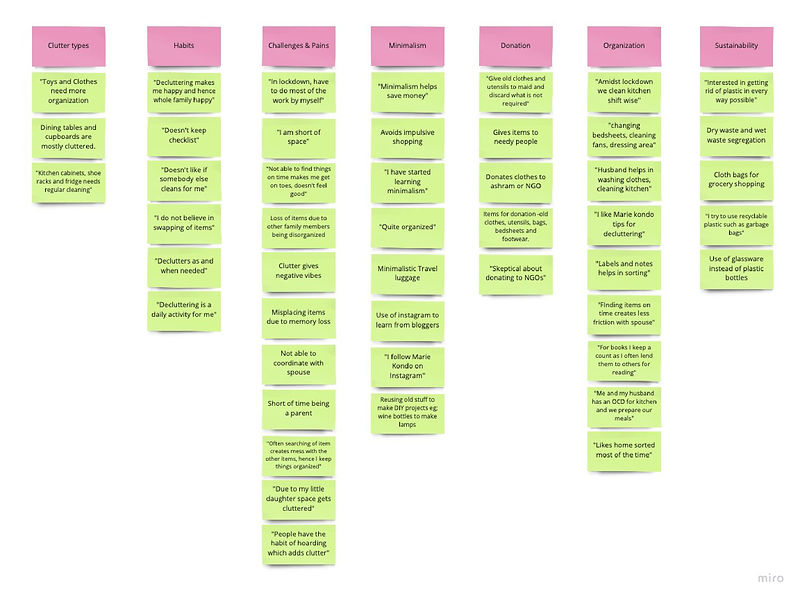
Empathy Mapping
To understand my users’ behaviours and pain points in detail, I had to create an empathy map so that I could categorize my users and further build personas.


Personas

Describe your image

Describe your image
Describe your image
Journey Mapping

Describe your image

Describe your image
Describe your image
After understanding pain points and frustrations of my users, I began to find the design opportunities.
Design Opportunities
How might we recycle all kinds of plastic or avoid its usage in our day to day life?
How might we devise a system that helps family members segregate waste at home ?
How might we creatively organise the kitchen, playroom and wardrobes ?
How might we effectively plan a decluttering schedule along with partners or roommates?
How might we help people avoid impulsive shopping ?
Competitor Analysis
Once I identified my problem space, I went on to find the competitor apps who were offering generic decluttering services and didn’t talk much about minimalism and sustainability. These apps were not targeting Indian market. Hence I didn’t have a major competitor in the Indian market, however I still analyzed these apps and did heuristic evaluation of each of them.
.png)
I began to brainstorm new ideas to reach the solution and design a complete
workflow of the product.
Ideation
I have used following ideation techniques to generate my ideas :
1. Crazy 8s
2. Mash up or Heuristic Ideation
3. Laddering
4. SCAMPER
Diverging Thinking Out Loud

Converging the idea

Solution
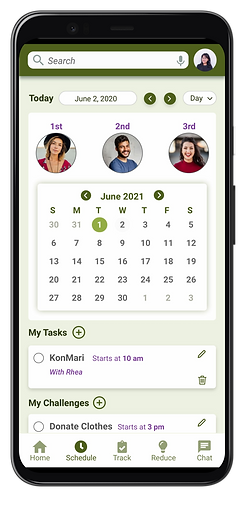
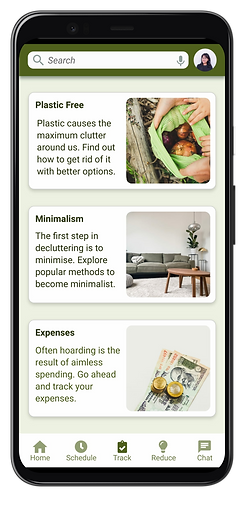
A sustainability inspired lifestyle product that helps users to schedule their decluttering regime via a mobile app and collaborate with other members of the house (roommates or family members) by assigning them tasks, track their shopping expenses to avoid hoarding, learn and participate in minimalism challenges, go for plastic alternatives, practice waste segregation, learn about recycling and donating old items. The app would be gamified with a feature to use timer and sync music with it.
User Stories
To identify the functional needs of my product I created user stories.
For example : “ As a user, I want to contact NGOs , so that I can donate easily.”
.jpg)
Sitemap
User stories helped me in fInalizing the architecture.

User Flows
Once I prepared the architecture & user stories, I went on to create the critical user flows of the product. These user flows are red routes which users will take to perform the necessary actions. I prepared 5 User Flows on Miro board. Click on each flow to view it.

Describe your image

Describe your image

Describe your image
Describe your image
Paper Sketches

Wireframes & Wireflows

Describe your image

Describe your image

Describe your image
Describe your image
Guerilla Usability Test Findings
After completing the wireframes, I went ahead to test my clickable prototypes with the users. Below are the following insights :
• Most of the users could not change the date in the calendar while scheduling for a task.
• Also in task creation overlay, they could not change the date. No scroll interaction was present.
• No interaction for the share icon.
Branding & Identity


High Fidelity Screens





Full Prototype Video
